


Handwriting for Text Input and the Impact of XR Displays, Surface Alignments, and Sentence Complexities
March 2026
What is the paper about?
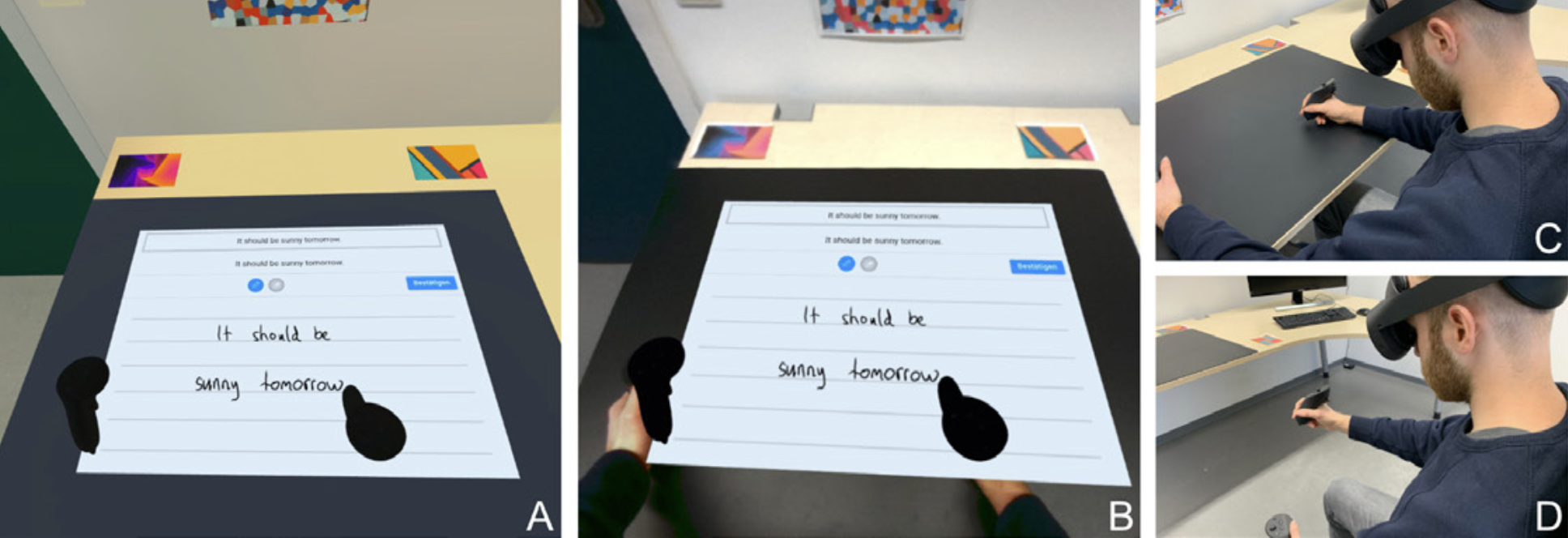
The authors investigate handwriting text input in both Virtual Reality (VR) and Augmented Reality (AR), comparing writing on different surfaces (a real table vs. mid-air). Additionally, they examine the effects of simple vs. complex sentences (e.g. “The early bird gets the worm.” vs. “Call me at: +49 800 1234567”) on text input speed, error rate, user experience, workload, and handwriting style.
Why is handwriting important?
The evolution of text input has shaped how humans communicate, share ideas, and interact with information. Although handwriting is increasingly marginalized or even abandoned in favor of keyboards, it remains essential due to its cognitive, motor, and expressive benefits. It should therefore complement, not replace physical and virtual keyboards, especially in an increasingly digital world shaped by technologies such as VR and AR.
What are the results?
- Handwriting Skills: Transfers into VR and AR with high usability, good user experience for both surface alignments and sentence complexities.
- Speed and Accuracy: Unaffected by XR displays (VR vs. AR) and surface alignments (physical vs. mid-air).
- Sentence Complexity: More complex sentences led to slower text input speed and more errors.
- Physical Surfaces: Easier to learn and less physically demanding. Mid-air felt more stimulating but caused greater arm fatigue.
- Handwriting Style: Influenced by surface alignments and sentence complexities, with mid-air surfaces and simple sentences resulting in larger, more connected cursive writing.
What are possible fields of application?
- Office Work in XR: Natural note‑taking, document editing, and writing emails.
- Education and Training: Immersive whiteboards and language learning.
- Secure or Hands‑free Input: Handwriting signatures, passwords, PINs, etc. without keyboards.
How does the research in the paper contribute to shaping the metaverse?
- Accessibility: Provides an intuitive alternative to virtual keyboards, with cognitive, motor, and expressive benefits.
- Immersive User Experience: Feels natural to use - it lets people write by hand in virtual worlds, so it feels more like real life and there is no context-switching between controllers or virtual keys.
- Flexibility: The system works well on both VR and AR devices, so it is up to the user and context which headset is used.
- Comfort: It shows the best use cases to use real objects (like a table) versus mid-air gestures, helping make virtual workspaces easier on your hands and body.
- Authentification: It tracks users’ writing behaviour (like stroke size or speed), which can be used for safe login or customization of virtual spaces
Reference
Kern, F., Tschanter, J., and Latoschik, M. E. (2024). Handwriting for Text Input and the Impact of XR Displays, Surface Alignments, and Sentence Complexities. IEEE Transactions on Visualization and Computer Graphics. https://doi.org/10.1109/TVCG.2024.3372124